The Home of Pro Audio Excellence. We deal in a number of high end pro audio products from Merging Technologies, Trinnov, Vanguard Audio Labs and more.
The Flexibility of NOVA in your Studio
10 November 2023

Discover the flexibility of NOVA in your studio. Whether you’re incorporating additional equipment, or simply using NOVA as your main DAC, NOVA can facilitate your needs.
NOVA and Audio Interfaces / DAC
Using NOVA as your Main DAC
-With an External Audio Interface
Don’t confuse the USB socket of NOVA for a sound card port.
If you want to connect your workstation to an audio interface via Thunderbolt or USB, you will have to use another sound card.

From this soundcard, you can configure a digital output to NOVA, either S/PDIF, ADAT or Dante if your audio interface supports Dante.
In this instance, NOVA provides the digital to analog conversion to the studio monitors.
-Without an External Audio Interface
As explained before, Dante Virtual Soundcard is a virtual soundcard running on your workstation.
With this software, you can use NOVA as your audio interface and DAC to your speakers without an external sound interface.
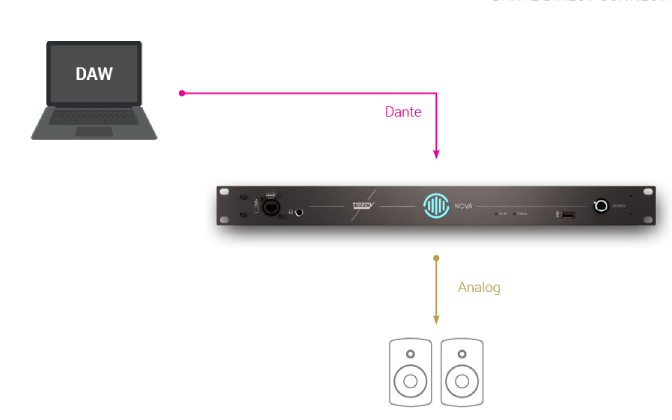
Your workstation can be connected straight to NOVA with an ethernet cable. If you need to add other Dante devices to your network, you will need a router.
Audio clocking changes too when using audio over IP, which is why we recommend you take the basic Dante courses from Audinate, which are freely available on their website.
What If I Want To Use An External DAC?
With its extensive connectivity, there are multiple ways to keep and use your existing DAC if you wish.
Let’s see the two integration options.
This first option is the most straightforward way to use an external DAC with NOVA.
Use Dante Virtual Soundcard to connect your workstation straight to NOVA. And then connect your external DAC via the AES output of NOVA to handle the D/A conversion to your monitors.

Insert Loop Integration
For the second option, we will see two different possibilities to illustrate the variety of connectivity options available.
In both options, we will consider an audio interface that connects to your workstation via USB or Thunderbolt, and doubles up as a High-End DAC. We also assume that the interface offers the possibility to set up an insert loop. In other words, you can insert a different device on the signal path (NOVA for that matter) between the input (workstation) and output (speakers).

Traditionally, we would use digital audio links to do so. With NOVA, you would need an S/PDIF or ADAT output from the interface to NOVA, and a digital input to send the processed signal from NOVA back to the interface.
The second option is to use an interface/DAC with Dante compatibility.
In that case, you would need to connect the interface and NOVA to the same local network via a network switch or router.
Similarly to the previous example, you would set up the insert loop from the audio interface using Dante inputs and outputs and connect them to NOVA’s Dante outputs and inputs via the Dante controller.

NOVA and Direct Outs
Using NOVA to Feed Mastering, Recording, and Metering Devices
NOVA features direct out in its monitoring section. Direct outs are used to send a signal unprocessed to the output of your choices. That output is not only unprocessed but also unaffected by the volume control, making it perfect to feed an analog outboard for mastering (compressor, limiter…), a tape recorder or a metering device.
Note that you can choose a fixed source among the sources you have configured in NOVA, or select “Follow monitoring” to send the same signal as what you listen through your speakers or headphones.
Using NOVA to Feed Headphone Amps
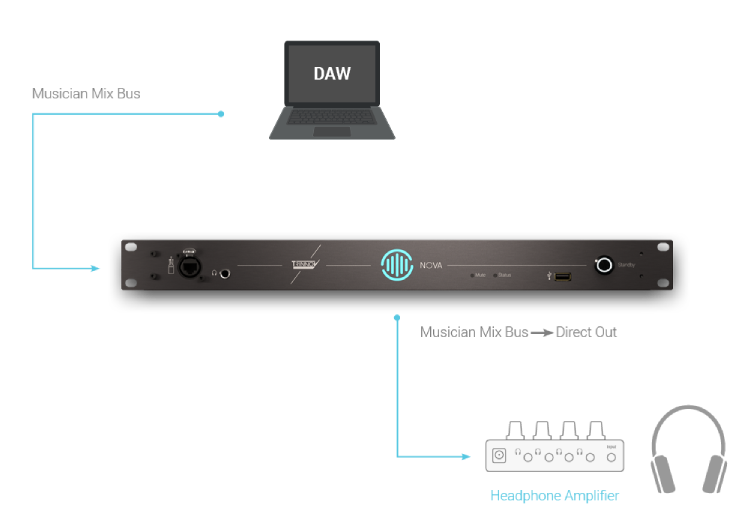
Direct outs can also be used to feed a headphone amp.
From your DAW you could create a specific bus for a musician, send it to a dedicated input/source of NOVA that would then be sent to the direct output.
NOVA and DVS
Connect Mic Preamps to NOVA
As explained in the Dante Virtual Soundcard section, DVS presents whatever signals is routed to it from the Dante Controller.
In that example, all we have to do is to route the analog input of NOVA through which we get the mic pre-out to a Dante output and route that Dante output to DVS in the Dante Controller.
The NOVA input is then visible and virtually available in the DAW as an audio interface input.
To retrieve your signal, the same principle applies to your master bus output, which you have to route to a DVS output and to a Dante input of NOVA via the Dante Controller.
Find out more information about DVS on the Audinate website.

Connect Synths or Other Instruments to NOVA
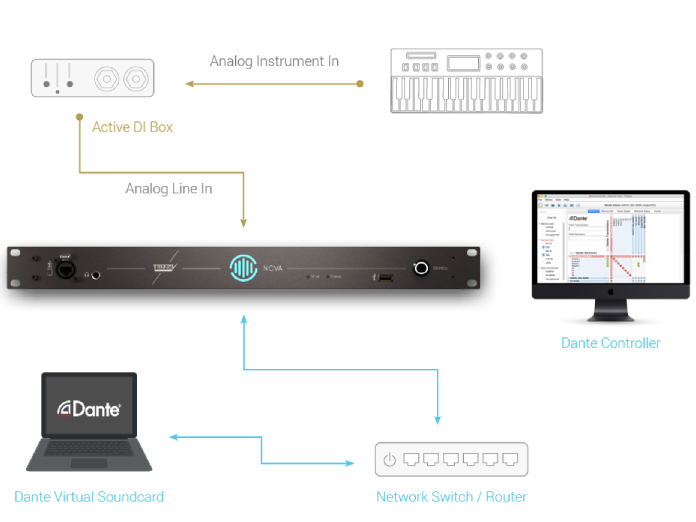
To connect a synthesizer, sampler or any other instruments to NOVA, the same principle applies, all you need is to make sure NOVA is fed with a line level signal (or a digital signal if it’s a digital instrument).
Note that direct outputs bypass the processing section of NOVA, but your feedback through the monitor is processed.
For more information on the Trinnov NOVA, click below.
-
 Trinnov NOVA£4,250.00 (£3,541.67 ex VAT) – £5,690.00 (£4,741.67 ex VAT)
Leading the way
Shining a spotlight on the industry, identifying who uses our products. Continue to read more of our user stories.
User Stories

Latest News
Ian Hultquist Discovers Trinnov and PSI
Paul Mortimer interviews composer and musician Ian Hultquist regarding his professional quality of life improvements,…


